What Is OLED and How Does It Work? OLED vs LCD Explained
OLED appears on spec sheets for premium phones, TVs, laptops, and gaming monitors – often with a significant price premium over LCD screens. The name means Organic Light-Emitting Diode, and the physics behind it explain every advantage and disadvantage you hear about: perfect blacks, risk of burn-in, vivid colors, and thin panels. This explainer covers how OLED works, how it compares to LCD, and what the variants (AMOLED, QD-OLED, WOLED) actually mean.
How LCD Works (The Comparison Point)
To understand OLED, it helps to first understand what it replaced. LCD (Liquid Crystal Display) uses a backlight – typically an array of LEDs behind the screen – to illuminate liquid crystals. The liquid crystals act as shutters, blocking or allowing the backlight to pass through color filters to create the image you see. The backlight is always on (or on with local dimming zones that can partially reduce brightness in specific areas).
This has two fundamental consequences: first, blacks are never truly black – even “black” pixels are just blocking most of the backlight, letting a small amount through (this is why you can see LCD blacks as gray in dark rooms). Second, the contrast ratio (the ratio between the brightest and darkest levels the screen can display) is limited by how well the LCD panel blocks the backlight – typically 1,000:1 to 5,000:1 for consumer panels.
How OLED Works
OLED takes a completely different approach: each pixel generates its own light. The organic compounds in each pixel emit light when electricity passes through them – they are the light source and the image simultaneously, with no separate backlight.
This single difference produces several cascading advantages:
- True blacks: When a pixel displays black, it simply turns off entirely – emitting no light. A black pixel is actually black, not dark gray. This is why OLED screens look dramatically different displaying photos or films with dark scenes.
- Infinite contrast ratio: Because black pixels emit zero light, the contrast ratio (brightest white vs. darkest black) is theoretically infinite. In practice, displays are quoted as 1,000,000:1 or “infinite” depending on measurement methodology.
- Fast pixel response time: OLED pixels switch from one color to another in approximately 0.03-0.1 ms – far faster than LCD pixels, which must physically re-align liquid crystal molecules (1-4 ms for fast IPS, 5-40 ms for VA). This eliminates motion blur in fast-moving content and makes OLED superior for gaming.
- Wide viewing angles: Since each pixel generates its own light directly toward the viewer, color and brightness remain consistent at extreme viewing angles. LCD panels shift color and lose contrast when viewed from the side because the backlight is directional.
- Thin and flexible: Without a separate backlight, LCD polarizers, and diffuser layers, OLED panels can be made extremely thin. This is why OLED phones are so slim. OLED can also be fabricated on flexible substrates – enabling curved and foldable displays.
OLED’s Disadvantages
- Burn-in: Organic compounds degrade with use – pixels that display the same static content for extended periods fade faster than surrounding pixels, leaving a faint permanent ghost image. This is called burn-in or image retention. Modern phones use software mitigations (pixel refresh cycles, shifting static UI elements by a few pixels) that have made burn-in much rarer than in early OLED screens. For desktop monitors, static taskbars and navigation chrome are a risk in long-term use.
- Lower peak brightness than mini-LED LCD: OLED panels have lower maximum brightness than modern mini-LED backlit LCD displays. Mini-LED TVs can reach 2,000-4,000 nits peak brightness in HDR; current OLED TVs reach 1,000-1,500 nits. The OLED’s infinite contrast more than compensates for this in dark rooms, but in a brightly lit room, a high-brightness mini-LED display can look more vivid for HDR content.
- Cost: OLED manufacturing is more complex than LCD, and yields (the percentage of manufactured panels that meet quality standards) are lower. This is why OLED panels cost significantly more than comparable-size LCD panels.
OLED Variants Explained
AMOLED
AMOLED (Active Matrix OLED) is the most common type in smartphones. “Active Matrix” refers to the transistor array that controls each pixel individually – this is how modern OLED displays function at high resolutions. When you see “AMOLED” or “Super AMOLED” on a Samsung phone spec sheet, it means an OLED panel with an integrated touch layer (Super AMOLED puts the touch layer in the display rather than as a separate layer on top).
QD-OLED
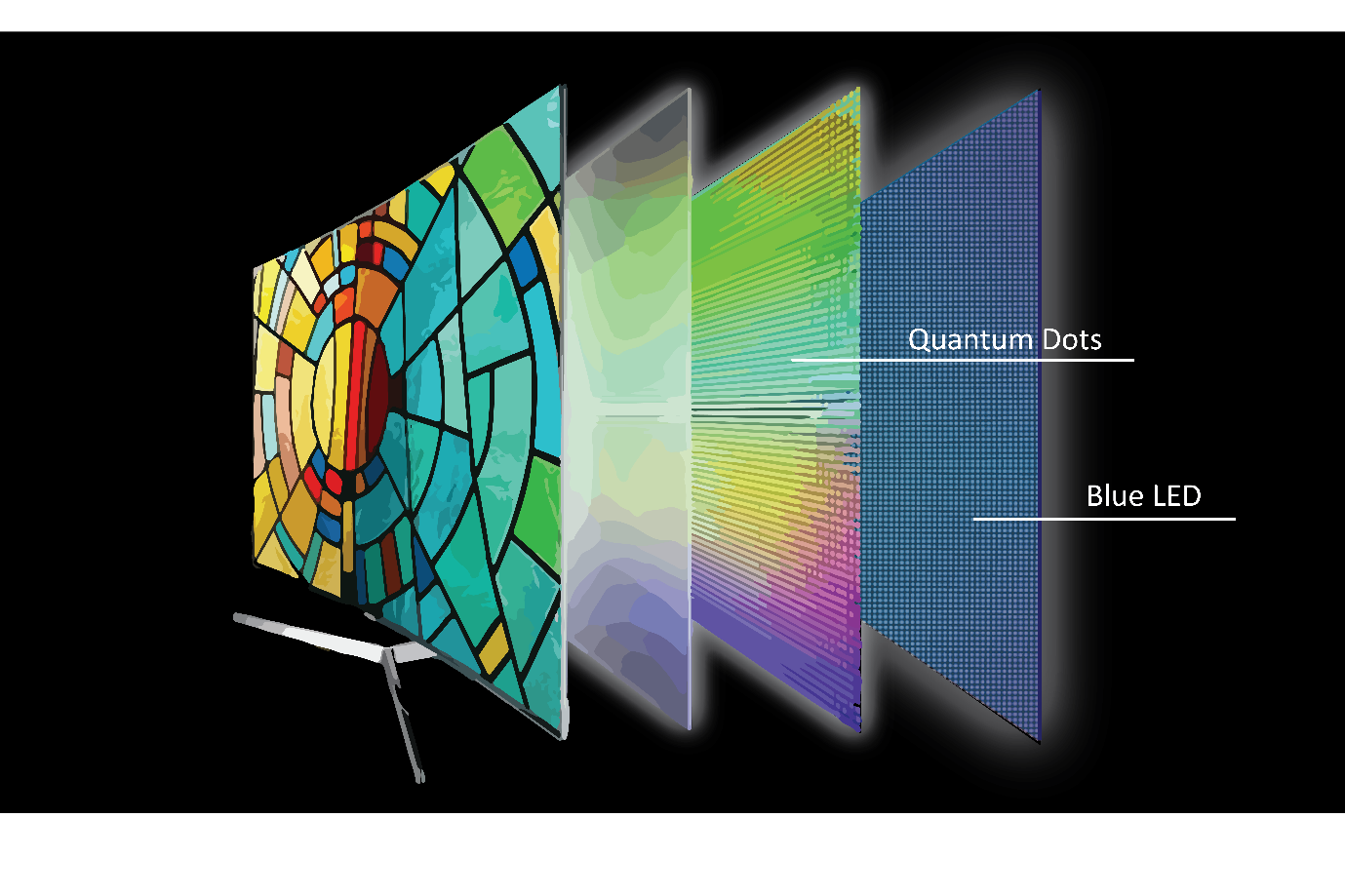
QD-OLED (Quantum Dot OLED) is Samsung Display’s premium TV and monitor panel technology. It uses a blue OLED layer as the backlight for quantum dot color conversion elements – the quantum dots absorb blue light and emit precise red and green wavelengths. The result is a wider color gamut (covering DCI-P3 and approaching Rec. 2020 color spaces) and higher brightness than traditional white-OLED designs. The Sony Bravia XR and Samsung S90D TVs use QD-OLED panels; the Alienware QD-OLED and MSI QD-OLED gaming monitors use the same technology.
WOLED (White OLED)
LG manufactures OLED panels for most premium TVs not made by Samsung using WOLED – a white OLED emitter with color filters placed over it. This is more efficient at large screen sizes than using red, green, and blue organic materials separately. The LG G4 and C4 OLED TVs use WOLED with MLA (Micro Lens Array) technology that improves light extraction efficiency, reaching up to 1,300 nits peak brightness – competitive with early QD-OLED panels.
Should You Choose OLED?
For a phone: if the device has an OLED screen, it is the correct choice for any phone priced above $400 in 2026. The difference in display quality is immediately noticeable for photos, videos, and dark-mode interfaces.
For a gaming monitor: OLED gaming monitors have dropped to $400-$600 for 27-inch 1440p models and are the best choice for anyone who prioritizes motion clarity and image quality over static image durability. The burn-in risk is manageable with normal gaming use.
For an office monitor: the burn-in risk from static UI elements makes OLED less straightforward for a work monitor used all day every day. A high-quality IPS panel (which has improved dramatically in recent years) is often the safer recommendation for professional desktop use.
For a TV: OLED is the clear choice for dark room viewing and movie watching. For a bright living room with lots of ambient light, a high-brightness mini-LED LCD may look better during daylight hours despite the inferior black levels.
For more context on how OLED compares to IPS and VA panels in a purchasing decision, see our monitor buying guide which covers panel type selection alongside resolution and refresh rate.