Refresh rate shows up in monitor and phone specs as a number followed by “Hz” – 60Hz, 90Hz, 120Hz, 144Hz, 240Hz. It is one of those specs where the number’s meaning is clear but the practical implications are not. This explainer covers what refresh rate actually is, how it interacts with frame rate, and when paying for a higher refresh rate makes a real difference.
What Refresh Rate Is
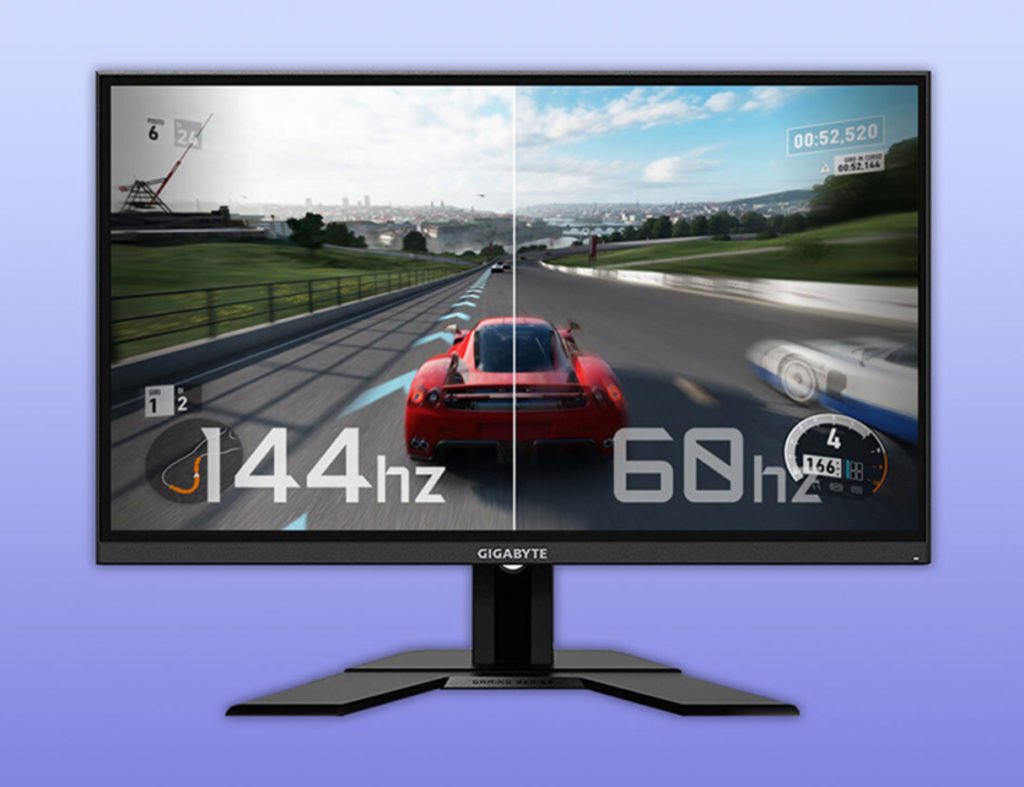
Refresh rate is how many times per second a display draws a new image on screen. A 60Hz monitor draws 60 frames per second. A 144Hz monitor draws 144 frames per second. The unit Hz (hertz) means “cycles per second” – so 144Hz means 144 complete screen refreshes every second.
Each frame lasts for 1/refresh_rate seconds. On a 60Hz display, each frame is visible for 16.7 milliseconds before the next one replaces it. On a 144Hz display, each frame lasts only 6.9 ms. This time-per-frame is what creates the feel of smoothness – shorter duration per frame means motion appears more continuous and less like a series of still images.
Refresh Rate vs Frame Rate
Refresh rate is a display property. Frame rate (measured in fps – frames per second) is how fast your computer, phone, or game console generates new images to display. These two numbers interact, and mismatches cause visual artifacts:
Frame rate lower than refresh rate: The display shows the same frame multiple times while waiting for the next one. A game running at 45 fps on a 144Hz monitor means each frame is shown on screen about 3.2 times, which the eye can perceive as stuttering.
Frame rate higher than refresh rate: The GPU outputs frames faster than the display can show them. Some frames are displayed during a screen refresh partway through – half the screen shows frame N and the other half shows frame N+1. This is called screen tearing and looks like a horizontal tear or split in the image during motion.
Frame rate matches refresh rate: Ideal. Each refresh shows a new, complete frame. This requires either locking the game’s frame rate to the monitor’s refresh rate (VSync) or using adaptive sync (G-Sync or FreeSync).
Adaptive Sync: G-Sync and FreeSync
Rather than fixing either the frame rate or refresh rate, adaptive sync technologies make the monitor’s refresh rate match the GPU’s output frame by frame. When the GPU produces 87 frames per second, the monitor refreshes at 87Hz for that moment. When it drops to 73 fps in a complex scene, the monitor adjusts to 73Hz. The result is no tearing and no stuttering across a wide range of frame rates.
G-Sync (NVIDIA): The original implementation, requires dedicated hardware in the monitor. Guaranteed to work at any frame rate within the supported range.
FreeSync (AMD): AMD’s version, uses the existing DisplayPort Adaptive Sync standard, no dedicated monitor hardware required – lower cost for manufacturers, which is why most gaming monitors support FreeSync.
G-Sync Compatible: NVIDIA certifies certain FreeSync monitors as G-Sync Compatible if they pass quality testing. Most NVIDIA GPUs work with any FreeSync monitor, though performance varies.
Why the Jump from 60Hz to 120Hz Feels Dramatic
The human visual system does not perceive smoothness linearly. The difference between 60Hz and 120Hz is enormous and immediately noticeable to almost everyone. The difference between 120Hz and 240Hz is smaller and most perceptible during fast gaming. The difference between 240Hz and 360Hz is noticeable primarily to professional esports players in competitive scenarios.
The 60-to-120 jump feels so significant because it cuts the motion blur and judder of each frame in half. Scrolling text, fast camera movements, and cursor movement all appear dramatically more fluid. For touchscreen phones, the improvement is even more pronounced because you perceive the touch response as feeling faster and more direct when the display redraws more frequently.
Apple introduced 120Hz ProMotion on the iPhone 13 Pro in 2021. Since then, most Android flagships run at 120Hz, and many budget phones have adopted 90Hz. A phone that returns to 60Hz after you have used 120Hz feels noticeably sluggish in comparison.
Variable Refresh Rate on Phones and TVs
Modern smartphones and TVs use variable refresh rates – adjusting the panel refresh rate dynamically based on what is being displayed. An iPhone in standby mode or showing a static document might refresh at 10Hz to save battery. During a fast-scrolling social media feed, it boosts to 120Hz. This adaptive approach is why 120Hz flagship phones have surprisingly competitive battery life despite the higher panel capability.
Apple calls this ProMotion; Samsung calls it Adaptive Refresh Rate or AOR; other manufacturers have similar branding. The underlying technology is LTPO (Low Temperature Polycrystalline Oxide) – a display backplane technology that enables variable refresh rates at low power consumption.
When Higher Refresh Rate Does Not Help
A 144Hz monitor showing a video that was filmed at 24fps does not make the video smoother in any natural way – the film is 24 frames per second regardless of display capability, and some processing modes (motion smoothing on TVs) create the uncanny “soap opera effect” that filmmakers and videophiles turn off immediately. Higher refresh rate primarily benefits content that generates frames at variable rates: games, scrolling UIs, cursor movement, and real-time rendered content.
For reading, productivity work, and static image viewing, 60Hz is indistinguishable from 144Hz. The spec matters most for gaming, phone navigation, and any context where smooth motion is part of the user experience. For more context on how refresh rate fits into a monitor purchasing decision alongside panel type and resolution, see our complete monitor buying guide.
Bluetooth is in almost every device you own, but most people have no idea why it sometimes drops, why range varies so much, or what the version number on the spec sheet actually means. This explainer covers all of it.
OLED appears in the spec sheets of premium phones, TVs, laptops, and monitors. This explainer covers how OLED actually works, why it produces better blacks, and where LCD still has advantages.
Latency is the delay between an action and its result – whether that is your click registering in a game, your voice reaching someone on a call, or a webpage loading. This explainer covers network latency, input latency, and display latency, and why each type matters differently.
CPU spec sheets throw numbers at you – 16 cores, 32 threads, 5.7 GHz boost clock. This explainer translates what those numbers mean for actual performance, when more cores help, and when clock speed matters more.
Buying a monitor is harder than it looks – resolution, panel type, refresh rate, and response time all interact with each other and with your specific use case. This guide cuts through the spec sheet to tell you what actually matters.
DDR5 is faster than DDR4 on spec sheets, but the real-world performance difference depends heavily on your CPU and workload. This explainer covers what changed between generations and which one makes sense for a PC build in 2026.