How to Choose a Monitor: Resolution, Panel Type, and Refresh Rate Explained
A monitor is the part of your setup you stare at for hours every day, yet it is often the last thing people research carefully. The right choice depends heavily on what you use it for – a monitor ideal for a graphic designer is different from one built for competitive gaming, and both are different from the best all-around desk monitor for everyday work. This guide helps you identify the specs that matter for your use case and cut through the ones that do not.
Step 1: Decide on Screen Size
Screen size is the most obvious choice but often the least nuanced decision. General guidance:
- 24 inches: The competitive gaming standard. Smaller means the whole screen sits within your field of view without moving your head, which is advantageous in fast-paced shooters where peripheral vision matters. Works best at 1080p.
- 27 inches: The most popular size for all-around use. Works well at both 1440p and 4K. Comfortable viewing distance from a typical desk.
- 32 inches and above: Good for creative work, multi-document work, or media consumption. 4K makes more sense at this size since 1440p starts to look soft up close. Ultrawide monitors (34-inch, 21:9 aspect ratio) fall in this category and add horizontal workspace without extra height.
Step 2: Choose a Resolution
Resolution determines pixel density – how sharp the image looks – relative to the screen size. The combinations that make sense:
| Size | Best Resolution | Notes |
|---|---|---|
| 24 inch | 1080p (1920×1080) | Standard for competitive gaming; good pixel density |
| 27 inch | 1440p (2560×1440) | Sweet spot for productivity and gaming |
| 27 inch | 4K (3840×2160) | Very sharp; needs powerful GPU to game at 4K |
| 32 inch | 4K (3840×2160) | Ideal at this size; 1440p looks soft |
| 34 inch ultrawide | 3440×1440 | Wide format, equivalent to 1440p height |
Running a 4K monitor at gaming frame rates requires a powerful GPU – an RTX 4070 or better for modern games at high settings. If your GPU is more modest, 1440p at high frame rates often looks and feels better than 4K at lower frame rates.
Step 3: Understand Panel Types
The panel technology determines color accuracy, viewing angles, contrast, and response time. The main types:
IPS (In-Plane Switching)
Best for: color-accurate creative work, general use, any situation where viewing angle matters. IPS panels produce accurate, consistent colors with wide viewing angles – colors do not shift when you look from the side. Contrast ratios are typically 1000:1, which is good but not exceptional. Blacks look gray in dark rooms compared to VA or OLED panels. Modern Fast IPS panels have closed the response time gap with TN significantly.
VA (Vertical Alignment)
Best for: media consumption, dark room gaming, productivity. VA panels have much higher contrast ratios (typically 3000:1-5000:1) compared to IPS, making blacks look genuinely black rather than gray. This is noticeable watching movies or playing dark games. Trade-offs: slower pixel response times (more smearing in fast motion) and narrower viewing angles than IPS. Good choice if you watch a lot of content and sit directly in front of the monitor.
OLED
Best for: premium gaming and creative use where budget allows. OLED panels (including QD-OLED) produce perfect blacks (pixels turn off individually), infinite contrast, and the fastest response times of any panel technology – typically 0.03 ms. Colors are vibrant and accurate. The trade-offs: risk of burn-in with static UI elements over time (less common now with modern OLED management features, but still a consideration), and premium pricing ($500+). OLED monitors have come down significantly in price and are increasingly worth considering for dedicated gaming or media setups.
TN (Twisted Nematic)
The original gaming panel – poor color accuracy, terrible viewing angles, but the fastest response times of traditional LCD panels. TN has been largely replaced by Fast IPS for competitive gaming. Hard to recommend new TN monitors in 2026 except at the very budget end.
Step 4: Refresh Rate
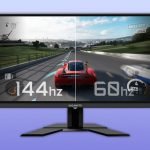
Refresh rate (measured in Hz) is how many times per second the monitor updates the image. Higher is smoother, but only if your GPU can produce enough frames to match:
- 60 Hz: Standard for office work and productivity. Fine for non-gaming use.
- 144 Hz: The minimum worth targeting for gaming – the jump from 60 Hz to 144 Hz is dramatic and immediately noticeable.
- 165-180 Hz: Common on 1440p gaming monitors; good middle ground between refresh rate and resolution.
- 240-360 Hz: For competitive FPS gaming where every frame advantage matters. Requires a powerful GPU to consistently hit these frame rates.
Step 5: Response Time
Response time (measured in ms) is how fast a pixel can change color. Lower is better for fast motion – high response times cause visible ghosting or smearing behind fast-moving objects. For gaming, look for 1-4 ms GtG (Grey-to-Grey). For office use and creative work, response time barely matters. Be aware that manufacturers sometimes advertise “1 ms” using MPRT (Moving Picture Response Time) – a marketing metric that does not reflect actual pixel transition speed. Look for GtG specifications specifically.
Other Specs Worth Checking
- Adaptive sync: Look for G-Sync Compatible or FreeSync Premium – these sync the monitor’s refresh rate to your GPU’s output, eliminating screen tearing without needing VSync (which adds input lag). Most monitors support this now.
- HDR: True HDR requires 600+ nits brightness and local dimming. Budget monitors labeled “HDR400” deliver minimal HDR benefit – the real HDR experience starts at DisplayHDR 600 or higher.
- Connectivity: Confirm the monitor has the ports your GPU or laptop outputs – DisplayPort 1.4 handles 4K/144Hz; HDMI 2.1 handles 4K/120Hz. USB-C with DisplayPort Alt Mode is useful for laptop users who want a single-cable connection.
If you are pairing this monitor with a new GPU, our GPU buying guide covers which graphics cards make sense at each resolution and frame rate target to help you match the two purchases correctly.