Top 10 Best Cloud Storage Services of 2026
Choosing the right cloud storage service depends on your device ecosystem, collaboration needs, and budget. We evaluated these services based on storage pricing, cross-platform compatibility, sync reliability, and unique features. Whether you are deeply invested in Apple, Google, or Microsoft products – or need something that works everywhere – this list covers the best options available today.
1. Google Drive / Google One
Google One offers 15GB free storage shared across Gmail, Drive, and Photos, with paid plans starting at $2.99 per month for 100GB and $9.99 per month for 2TB. The service integrates seamlessly with Google Docs, Sheets, Slides, and Gmail, making real-time collaboration effortless. Google Photos uses this storage and provides the best AI-powered photo search and organization available in any cloud service.
Google Drive is the obvious choice for Android users and anyone relying on Google Workspace for productivity. The main weakness is privacy – Google scans content for advertising purposes, which concerns some users. Cross-platform apps work well on Windows, Mac, iOS, and Android.
2. iCloud+
Apple’s iCloud+ starts at $0.99 per month for 50GB, $2.99 for 200GB, and $9.99 for 2TB. The service automatically syncs Documents and Desktop folders across Mac computers, while Photos, Messages, Health data, and device backups all integrate without configuration. iCloud Keychain syncs passwords across all Apple devices securely.
iCloud is ideal for users fully committed to the Apple ecosystem with Mac, iPhone, and iPad. The iCloud for Windows app exists but remains clunky compared to native macOS integration. Android users have virtually no access to iCloud services, making this a poor choice for mixed-device households.
3. Dropbox Plus
Dropbox Plus costs $11.99 per month for 2TB, making it the priciest mainstream option. However, Dropbox pioneered cloud sync and its Smart Sync feature – showing cloud files in your file system without downloading until opened – remains more polished than competitors. Dropbox Paper provides collaborative document editing, and the service works identically across Windows, Mac, Linux, iOS, and Android.
Dropbox excels for cross-platform teams and power users who need reliable sync across different operating systems. The higher price and limited free tier of just 2GB make it less attractive for casual users or those primarily storing photos.
4. Microsoft OneDrive
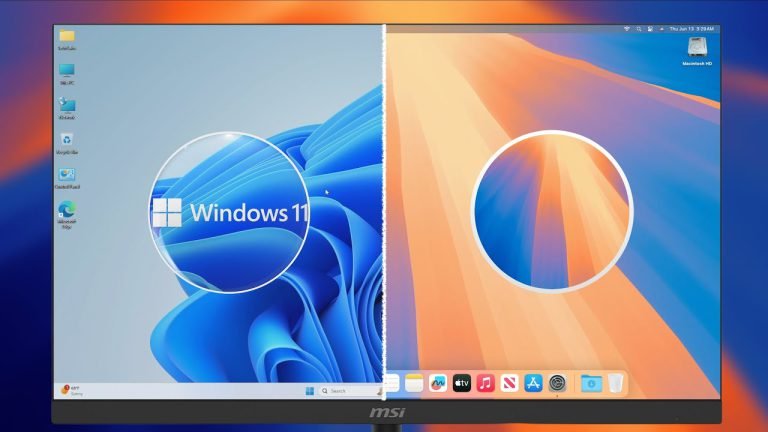
OneDrive provides 5GB free, with 100GB at $1.99 per month. The best value comes bundled with Microsoft 365 Personal at $6.99 per month, which includes 1TB storage plus Word, Excel, PowerPoint, and Outlook. OneDrive integrates directly into Windows 11 File Explorer and syncs with Microsoft Office apps for automatic document saving.
OneDrive is the natural choice for Windows users and Microsoft 365 subscribers who already pay for the productivity suite. Mac and mobile apps work adequately but lack the tight Windows integration. The Personal Vault feature adds extra security for sensitive files.
5. pCloud
pCloud offers a unique lifetime plan – pay $199 for 500GB or $399 for 2TB once and keep storage forever with no recurring fees. Monthly plans run $4.99 for 500GB or $9.99 for 2TB. The Swiss-based company emphasizes privacy, and the optional pCloud Crypto add-on provides client-side encryption for $4.99 per month.
pCloud suits users tired of subscription fatigue who want predictable long-term costs. The lifetime plans represent excellent value if you plan to use cloud storage for several years. Sync speeds occasionally lag behind Google and Microsoft in some regions.
6. Sync.com
Sync.com focuses on privacy with zero-knowledge encryption enabled by default on all plans. Pricing starts at $8 per month for 2TB with the Solo Basic plan. All files are encrypted before leaving your device, meaning Sync.com cannot access your data even if compelled by authorities. The service is based in Canada and complies with GDPR and HIPAA requirements.
Sync.com is excellent for professionals handling sensitive data – lawyers, healthcare workers, and journalists benefit from the strong encryption defaults. The apps are less polished than mainstream competitors, and collaboration features are more limited than Google or Microsoft offerings.
7. IDrive
IDrive combines cloud storage with true backup functionality, offering 5TB for $4.98 per month or 10TB for $7.48 per month when billed annually. The service backs up unlimited devices under one account, including computers, phones, and external drives. IDrive also offers physical drive shipping for initial large backups and disaster recovery.
IDrive is perfect for users who need comprehensive backup rather than just file sync – small businesses and photographers with large archives benefit from the generous storage and multi-device support. The interface feels dated compared to sleeker competitors, and sync can be slower than Dropbox or Google Drive.
8. Icedrive
Icedrive offers a clean, modern interface with 10GB free storage – generous compared to most competitors. Paid plans include 150GB for $1.99 per month, 1TB for $4.99 per month, and lifetime options similar to pCloud. The service uses Twofish encryption and provides a virtual drive feature that displays cloud files without syncing them locally.
Icedrive appeals to users wanting a straightforward, attractive cloud storage experience without complexity. The service is newer and smaller than established players, which may concern users prioritizing long-term reliability. Third-party app integrations remain limited compared to Google or Microsoft.
9. Backblaze B2 Cloud Storage
Backblaze B2 is object storage priced at $6 per TB per month with pay-as-you-go billing – dramatically cheaper than consumer services for large storage needs. The service integrates with popular backup tools like Duplicati, rclone, and Cyberduck. Backblaze also offers personal computer backup at $9 per month for unlimited storage from a single computer.
Backblaze B2 suits developers, IT professionals, and anyone with massive storage requirements who can handle more technical setup. Casual users wanting simple drag-and-drop file management should look elsewhere. The personal backup product works better for non-technical users.
10. Proton Drive
Proton Drive comes from the makers of ProtonMail and emphasizes end-to-end encryption and Swiss privacy laws. Free accounts include 1GB, while Proton Unlimited at $9.99 per month bundles 500GB storage with ProtonMail, ProtonVPN, and Proton Calendar. All files are encrypted before upload using open-source, audited code.
Proton Drive is best for privacy-conscious users who already use or want to use other Proton services. Storage amounts are smaller than competitors at similar prices, so this is not the choice for users prioritizing raw capacity. The service is still maturing and lacks some features found in older platforms.
Bottom Line: Google Drive and iCloud remain the best choices for users committed to their respective ecosystems, while OneDrive offers excellent value for Microsoft 365 subscribers. Privacy-focused users should consider Sync.com or Proton Drive, and those wanting to escape subscriptions entirely should look at pCloud or Icedrive lifetime plans.